 PinDeck
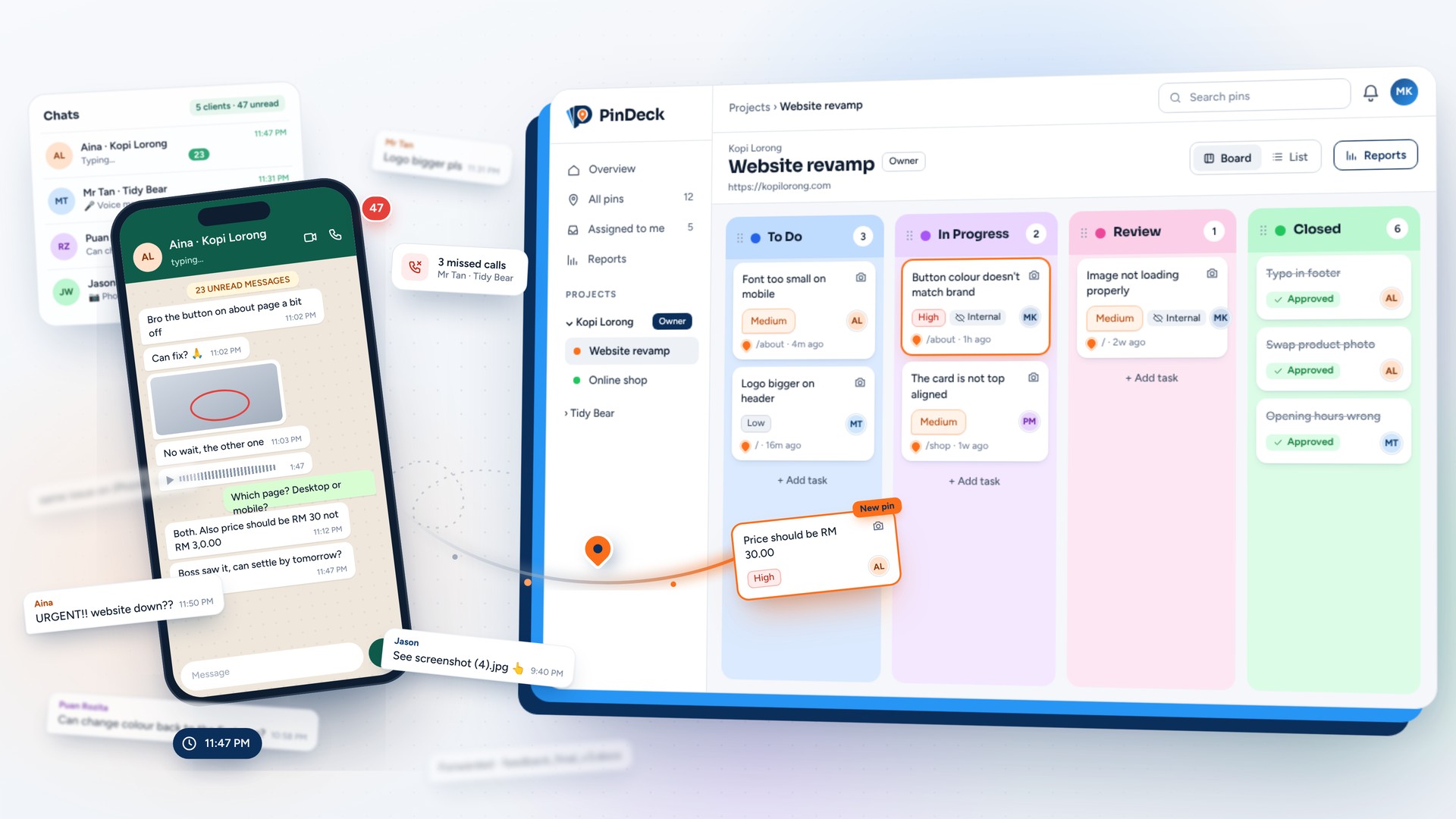
If you do client work, you probably know this message:
Which button? Which about page, desktop or mobile? Off how? Sometimes there's a screenshot. Usually it's cropped, taken on a phone, and sent late at night along with four other things in the same bubble.
I build websites and web apps as a developer and freelancer in Malaysia, and this part of the job never got easier. The actual fixing is fast. Figuring out what to fix is the slow part. So I built a small tool for it. It's called PinDeck, and this post is about why it exists, how it works, and a few decisions I made while building it.
Why not just use an existing tool?
Fair question. Visual feedback tools already exist. BugHerd is the one most people know, and it's good.
But when I looked at them as a freelancer, two things kept bothering me.
First, pricing. Most tools charge a monthly fee per seat or per workspace. That makes sense for an agency with a steady pipeline. It makes less sense when you have one website project that runs for three months, then nothing for a few weeks, then two projects at once. I didn't want to pay every month just to keep the lights on between jobs.
Second, weight. A lot of these tools have grown into full project management suites. My clients don't want another dashboard to learn. They want to point at something and say "this one". That's it.
Make it easy for a non-technical client to report a problem on the real page, and get everything I need to fix it without a single follow-up question.
That was the whole goal for PinDeck.
How it works: pin it, fix it, close it
The whole flow fits in four steps.
- 1
Create a project
Add the site URL and invite your client and developers by email. Clients and reviewers don't pay anything.
- 2
Client pins feedback on the live site
They install the PinDeck Chrome extension, open the website, and click the exact element they're talking about. They type a comment, or suggest a text change directly. A screenshot, the page URL, browser, OS and screen size get attached automatically.
- 3
Developer fixes it
The pin lands in the dashboard, either as a list or on a Kanban board. Assign it, work on it, move it to In Progress. When it's done, move it to Review and the client gets notified.
- 4
Client verifies and closes
They check the fix on the real page. If it's good, they close the pin. If not, they reopen it with a reply, and it goes back to you.
That last step matters more than it looks. In the WhatsApp world, "done" means I think it's done. In PinDeck, the client is the one who closes the issue. At the end of the project you can export a report with every pin and its outcome, which is handy for handover, or when someone asks "did we fix that thing?" three months later.
A few decisions I made along the way
No script on the client's website
A lot of feedback tools ask you to paste a JavaScript snippet into the site. I went with a Chrome extension instead. That means nothing to install on the project, nothing to forget to remove before launch, and it works on staging, live and password-protected sites.
The trade-off is that your client needs Chrome or a Chromium browser like Edge or Brave. In practice, almost everyone already has one.
Only four statuses
I kept it to four on purpose. Every extra status is one more thing for a client to misunderstand. Four turned out to be enough to answer the only question anyone really asks: "whose turn is it?"
Capture context automatically
Half of my old follow-up messages were "which browser?" and "can you send a screenshot?". Now the extension grabs that when the pin is created, so the client never has to think about it.
Pricing that fits how freelancers actually work
There are normal monthly plans (Pro and Agency) for teams with steady work. But I also added a project-based option: a small flat yearly fee, plus a one-time payment per project based on how long it runs (3, 6, 9 or 12 months).
If you only take a few projects a year, you pay for those projects and nothing else. Honestly, this was the part I wanted most for myself.
Free trial without a credit card
30 days, no card. If the tool isn't useful, you shouldn't have to remember to cancel anything.
Under the hood, and what I learned
For the developers reading this, the stack is fairly boring, which is how I like it: Supabase for auth and data, Stripe for payments, Brevo for transactional email, and Cloudflare in front of everything. The extension is a standard Chrome Manifest V3 extension.
A few things I'd tell myself at the start:
- Multi-tenancy is where the real risk is. Every project, pin and screenshot belongs to a team, and clients from one agency must never see another agency's data. I wrote a proper penetration testing plan before launch, and most of it ended up being about one question: can user A reach anything that belongs to user B?
- Feedback content is user input. Pins are text written by clients and shown to developers. Treat every comment as untrusted HTML, because one day someone will paste something weird into it.
- Pricing in two currencies is fiddly. I show USD by default and MYR for visitors from Malaysia. The USD price isn't a straight conversion, because Stripe's currency conversion fee eats into it. Small detail, but it took longer to settle than some features did.
- Keep your transactional email separate from marketing. Login and signup emails are the lifeline of a SaaS. I keep those on their own sending setup so a cold email campaign can never put them at risk.
- Build something to break. To test and demo PinDeck, I made a fake coffee shop website full of intentional bugs: typos, misaligned cards, broken images, a cart that adds two items instead of one. It turned out to be the best way to show the product, because everyone immediately wants to start pinning things.
Try it, and tell me what's missing
PinDeck is live at pindeck.net. There's a 30-day free trial, no credit card needed, and your clients can join for free.
It's still a small product built by one developer, so I'm genuinely interested in what you'd change. If you run a web agency or freelance, try it on your next client project and let me know where it falls short. You can reach me at [email protected].
And if you've found a better way to handle client feedback than WhatsApp screenshots, I'd love to hear that too.
Pin it, fix it, close it.
Start a 30-day free trial. No credit card, and your clients join free.